Virtual Interview Etiquette: 15 Expert Tips to Stand Out Online
May 19th, 2026
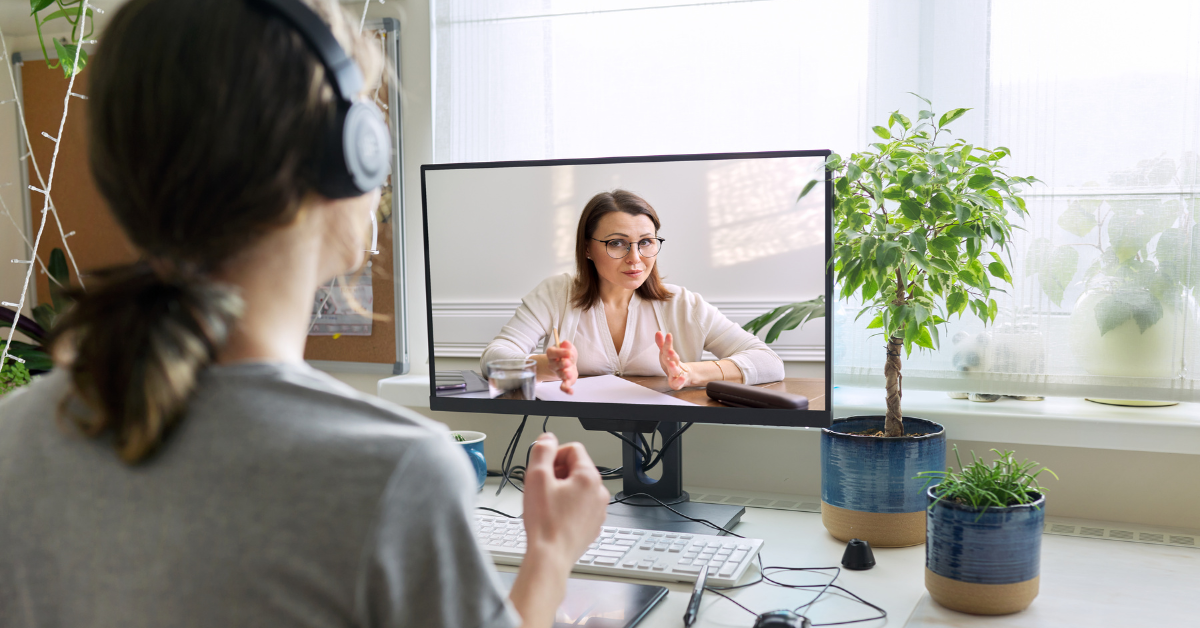
Remote hiring has transformed the modern recruitment process. From first-round screenings to final interviews, employers are increasingly relying on virtual platforms to evaluate candidates quickly and efficiently. Whether through Zoom, Microsoft Teams, or Google Meet, online interviews have become a standard part of professional hiring.
But while virtual interviews offer convenience, many candidates still fail to make a strong impression because they underestimate the importance of their online presence. Poor lighting, weak eye contact, internet disruptions, distracting backgrounds, or casual communication can quickly affect how recruiters perceive professionalism and preparedness.
According to Indeed, virtual interviews continue to remain one of the most preferred screening methods among employers because they reduce hiring timelines and improve accessibility. This means candidates must now master online interview best practices to stay competitive.
The good news is that most virtual interview mistakes are preventable. With the right remote interview preparation, digital interview setup, and virtual communication skills, candidates can confidently stand out in online interviews and leave a lasting impression.
In this guide, you’ll learn:
- The most common virtual interview mistakes
- How to create the perfect interview setup
- What recruiters notice during online interviews
- Essential Zoom interview tips
- A practical checklist to prepare before joining the call
Why Virtual Interview Etiquette Matters
Virtual interviews may happen online, but hiring standards remain just as high as in-person meetings. Employers still evaluate communication, professionalism, confidence, adaptability, and attention to detail during every interaction. To also make the best impression before the interview, learn to write stellar resumes with this guide.
Strong online meeting professionalism demonstrates that you can:
- Communicate clearly in digital environments
- Adapt to remote work culture
- Handle technical situations calmly
- Represent yourself professionally online
A survey by Robert Half found that hiring managers often form impressions within the first few minutes of an interview. In virtual settings, your lighting, posture, background, and communication style contribute significantly to those impressions.
Candidates who practice proper remote hiring etiquette often appear more organized, reliable, and workplace-ready.
7 Virtual Interview Mistakes That Hurt Your Chances
Even highly skilled professionals can lose opportunities because of avoidable online interview mistakes. Here are some of the most common issues recruiters notice during virtual interviews.
1. Poor Internet Connection
Unstable internet can interrupt communication and create awkward pauses during conversations. Technical disruptions can make candidates appear unprepared, even when they are qualified.
Always test your Wi-Fi beforehand and keep a mobile hotspot ready as backup.
2. Bad Lighting
Dark rooms or strong backlighting make it difficult for interviewers to see facial expressions clearly. Proper lighting is essential for video interview professionalism.
Natural front-facing light or soft desk lighting works best.
3. Looking at Yourself Instead of the Camera
Many candidates constantly look at their own video feed instead of maintaining camera eye contact. This reduces engagement and weakens connection with the interviewer.
Looking directly into the camera creates more natural virtual communication skills.
4. Multitasking During the Interview
Switching tabs, checking messages, or reading emails during interviews is noticeable and unprofessional. Recruiters value full attention and active listening.
5. Noisy Backgrounds
Background noise from pets, traffic, television, or family members can distract both the interviewer and candidate.
Choose a quiet space whenever possible and consider using headphones for better audio clarity.
6. Logging in Late
Late arrivals immediately create a negative impression. Strong remote hiring etiquette means joining the interview at least five minutes early.
7. Weak Eye Contact and Body Language
Poor posture, distracted facial expressions, or lack of engagement can make candidates appear uninterested or nervous.
Positive body language remains essential, even in virtual settings.
Best Virtual Interview Setup
Your digital interview setup directly influences how professional and prepared you appear during the interview.
Camera Height
Position your camera at eye level to create natural engagement. Looking too far up or down can feel awkward and distracting.
Using a laptop stand or books can help improve camera positioning.
Lighting Placement
Lighting should face you directly rather than coming from behind. Backlighting creates shadows that reduce visibility.
Good lighting improves video interview professionalism and helps recruiters connect more naturally.
Background Setup
Choose a clean, clutter-free background with minimal distractions. Neutral spaces create a more professional appearance.
Virtual backgrounds should also remain simple and professional.
Audio Clarity
Clear audio is just as important as video quality. Test your microphone before the interview begins.
Noise-canceling headphones can significantly improve sound quality.
Internet Backup
Always prepare for unexpected technical issues. Mobile hotspots or secondary devices can help prevent disruptions.
Headset Recommendations
Using wired or Bluetooth headphones reduces echo and improves communication quality during interviews.
15 Expert Tips to Stand Out in Online Interviews
1. Test Your Technology Early
Check your camera, microphone, internet connection, and meeting platform before the interview starts.
2. Dress Professionally
Professional attire still matters in virtual interviews. Solid colors typically appear best on camera.
3. Maintain Camera Eye Contact
Looking into the camera instead of the screen creates stronger engagement.
4. Practice Clear Communication
Strong virtual communication skills involve speaking clearly, confidently, and at a steady pace.
5. Keep Important Documents Nearby
Have your resume, portfolio, and job description accessible during the interview. Take a look at this guide to prepare better.
6. Minimize Distractions
Close unnecessary tabs, silence notifications, and eliminate interruptions before the call begins.
7. Use Professional Language
Avoid slang and maintain a polished tone throughout the conversation.
8. Stay Calm During Technical Issues
Employers understand glitches happen. Calm problem-solving reflects professionalism and adaptability.
9. Sit With Good Posture
Strong posture conveys confidence and attentiveness.
10. Engage Actively
Smile naturally, nod occasionally, and respond thoughtfully during discussions.
11. Avoid Memorized Answers
Over-rehearsed responses sound robotic. Focus on conversational delivery instead. Take a look at this commonly asked questions guide to be confident.
12. Prepare Questions in Advance
Thoughtful questions show genuine interest and preparation.
13. Keep Water Nearby
A small but helpful detail that keeps you comfortable during long interviews.
14. End the Interview Professionally
Thank the interviewer sincerely and express appreciation for their time.
15. Follow Up After the Interview
Sending a thank-you email reinforces professionalism and leaves a positive final impression.
What Recruiters Notice During Virtual Interviews
Recruiters evaluate far more than technical qualifications during virtual interviews. They also pay attention to how candidates present themselves professionally online.
Confidence
Candidates who communicate calmly and clearly often appear more dependable and leadership-oriented.
Communication Clarity
Strong communication is one of the most important remote-work skills employers seek today.
Professionalism
Appearance, punctuality, etiquette, and preparedness all influence hiring decisions.
Attention to Detail
Small details such as lighting, audio quality, and organization reflect overall professionalism.
Adaptability
Employers value candidates who remain composed during technical glitches or unexpected interruptions.
According to insights shared by LinkedIn, employers increasingly prioritize adaptability and communication skills alongside technical expertise in remote work environments.
Virtual Interview Checklist Before Joining the Call
Before every virtual interview, review this checklist carefully:
- Test your internet connection
Ensure stable connectivity to avoid disruptions. - Charge your laptop fully
Prevent unexpected shutdowns during the interview. - Close notifications and unnecessary tabs
Reduce distractions and maintain focus. - Open your resume beforehand
Keep important information easily accessible. - Keep water nearby
Helpful for staying comfortable during longer conversations. - Silence your phone
Avoid interruptions during the interview. - Join the meeting five minutes early
Demonstrates punctuality and preparation.
Virtual Interview vs. In-Person Interview
| Factor | Virtual Interview | In-Person Interview |
|---|---|---|
| Eye Contact | Look into the camera | Look directly at interviewer |
| Setup | Lighting and audio matter | Physical presence matters |
| Technical Risk | Higher | Lower |
| Environment | Controlled background | Office environment |
| Communication | Digital cues matter | Full body language visible |
Understanding these differences can help candidates improve their online interview best practices and adapt more effectively.
The Impact of Strong Virtual Communication Skills
As remote and hybrid work continue growing worldwide, employers increasingly prioritize candidates who communicate effectively in digital environments.
Strong online meeting professionalism helps candidates:
- Build trust faster
- Improve collaboration
- Handle remote interactions confidently
- Adapt to modern workplace expectations
Candidates who master remote interview preparation often stand out because they demonstrate readiness for today’s evolving workforce.
Conclusion
Virtual interviews are now a core part of modern hiring, and strong virtual interview etiquette can significantly improve your chances of success. From refining your digital interview setup to improving your virtual communication skills, small changes can create a major impact on how recruiters perceive you.
By following these online interview best practices, maintaining video interview professionalism, and practicing proper remote hiring etiquette, you position yourself as a confident, adaptable, and workplace-ready professional.
At Synectics Inc., we help professionals prepare for today’s evolving hiring landscape through expert career guidance, interview preparation, and communication coaching.
Contact Synectics Inc. today to strengthen your interview skills and stand out in your next virtual opportunity.










.png)